Where can I view the details of my Margin Summary?
- Click on Start Menu > Reports >Margin Stmt
- Or Press Shortcut “Ctrl + M”
- Your Margin Summary window will be displayed
- Select the segment Equity OR Commodity from the filter given
- Click on Submit Button
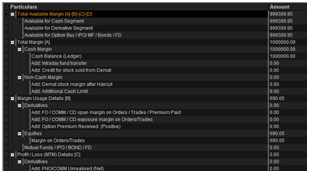
- Detailed Margin Summary report is available as (Click on ”+” sign to expand each menu)
- Total Available margin
- Total margin
- Margin usage details
- Profit/Loss (MTM) details
Top
Happy with the solution or Did not find what you were looking for?
Write to us faqfeedback@motilaloswal.com
Motilal Oswal Securities Limited © 2014