Where can I track my AMO orders?
- Click on Start Menu > Reports > Order Book
- Or Press Shortcut “F3”
- Order book will be opened where the status for all the orders placed for the day will be displayed
- To filter the AMO orders for the day, Go to AMO Column in Order book
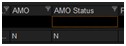
- If it is displayed as “Y” it will be an AMO order, if it is displayed as “N” it will not be an AMO order
Top
Happy with the solution or Did not find what you were looking for?
Write to us faqfeedback@motilaloswal.com
Motilal Oswal Securities Limited © 2014