How do I place Marginplus Sell Order?
- Press F10 after selecting the scrip from market watch
- You can also place Margin+ Sell from Start Menu > Action >Margin+ Buy
- The Margin+ Sell Order window will open in docked format at the bottom of the screen

- The Primary Order would be your Sell Order which would be default sent as a Market Order (In price box it will show the LTP for reference and it cannot be edited)
- Enter the order quantity
- For your secondary orders (Buy Orders)
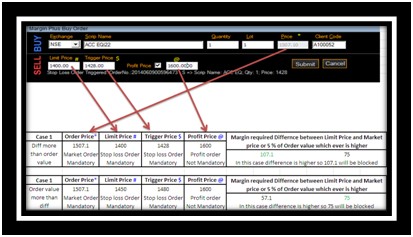
- Enter The Limit Price and Trigger Price auto populates
- Edit the Trigger Price if required (Minimum Gap between the Limit Price and Trigger Price should be 2%)
- Tick on Profit Price check box and enter your Profit Price (If required)
- Click on Submit Button
- Once your order has been placed you will be shown an acknowledgement message with order reference number
Example
Top
Happy with the solution or Did not find what you were looking for?
Write to us faqfeedback@motilaloswal.com
Motilal Oswal Securities Limited © 2014